Using ZeronWeekly volumeMenu
Weekly volume
The one number you set. Everything else follows from it.
What it is#
Your weekly volume is how much trading Zeron does for you each week: the total for all your exchanges together, not per exchange. Every buy and every sell counts, on both sides of every loop.
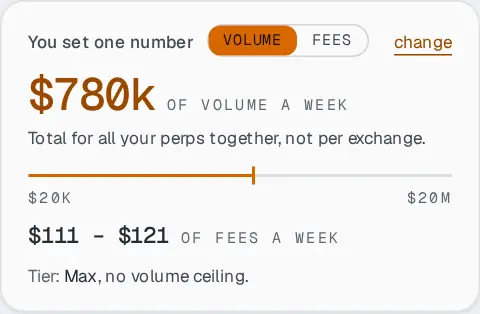
Volume or fees: your choice#
The card has two switches, Volume and Fees. Set the volume you want, and the card shows the fees it will cost. Or set the fees you are ready to pay each week, and it shows the volume you get. Both move together; switching does not change the next loop.
What it changes#
Raising the weekly volume makes each trade bigger, so:
- more fees each week, shown under the slider;
- more money needed on each exchange, shown in the Required column of the Perps tab.
The number of loops a day does not change: only their size. If an exchange does not have enough money for the size, it sits out until you add some, or until you lower the volume.
The weekly limit of your plan#
- Free
- $50k a week
- Pro
- $1M a week
- Max
- No limit
The week starts on Monday at 00:00 UTC. When the plan’s weekly volume is used up, Zeron stops until the next Monday and says so on the switch. The last loop of the week may go slightly over. If you set more than your plan allows, loops still run, at the plan’s limit, and an amber note tells you to lower the number. See the plans.